Lift Training
Welcome to Vail Resorts! Whether you are a new or returning employee, we’re so glad to have you on our team.
To prepare you for your career with us, you will be assigned digital training in our online learning system, called The LIFT. New hires will be assigned required courses upon receiving access to The LIFT.
Accessing the LIFT on a Computer
Click here to access The LIFT on a computer (or go to EpicEmployee > select Employee Services > Training and Performance > Learning and Development > Launch the LIFT Training Application.) Your assigned training will show in the “Me” tab on the homepage (or in the 'hamburger' menu for mobile users).
Choosing to Access the LIFT on a Mobile Device
See these instructions for how to access training on the LIFT via your mobile browser. The LIFT mobile application (Saba Cloud app) is no longer supported. If you have the LIFT app on your phone, please delete it and use your mobile browser to access the LIFT instead.
Make a plan with your manager to complete this training while you are clocked in during work hours.
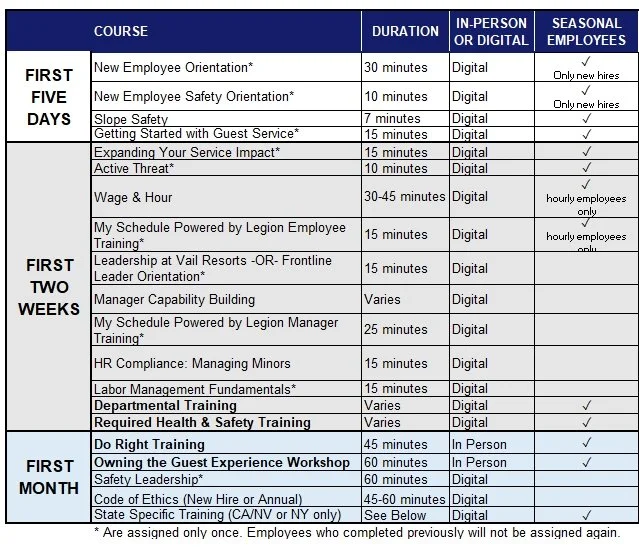
Note: Most of the courses below are automatically assigned in The LIFT and available to employees from their learning plan on the ME tab. Courses in bold are either delivered in-person or manager-assigned. Please work with your manager for guidance on how to complete these trainings.